


.gif)
(30 minutes earlier or the day before for early morning presenters)
| [PC Data Registration Desk]-Location: | Yonago Culture Hall, 1F in front of Room1 (Room1&2) Yonago Convention Center, 2F in front of Room3 (Room3-8) |
| Day 1(Wed, June 4) | 14:00-17:30 |
| Day 2(Thu, June 5) | 8:00-17:00 |
| Day 3(Fri, June 6) | 7:30-18:30 |
| Day 4(Sat, June 7) | 8:00-13:00 |
| Windows Users | Presenters may use a USB storage device to transfer their presentation data to the available computers. While it is permissible to bring and use your own laptop, we strongly encourage the use of USB storage devices instead to facilitate smoother transitions between presentations. |
| Macintosh Users | Due to compatibility and connectivity concerns, we highly recommend Macintosh users bring their own laptops to ensure the best presentation experience. |
| Creating presentation data |
-OS: Please create on Windows 10 or a later version. -Application: Use Microsoft PowerPoint 2016, 2019. -Screen Size: Design your slides for a 16:9 aspect ratio for full-screen display. A 4:3 ratio is acceptable but will result in a slightly smaller display. |
| File size | -There is no strict limit on the file size of the presentation data, but please ensure your content can be delivered within your allotted presentation time. |
| How to submit data | -Media format: Only USB storage devices are accepted. Copy your presentation to a USB device before the conference. -Save your presentation in a folder named with your presentation number and name. This folder should only contain the PowerPoint file and any associated media files. -Submission and return: Bring your USB device at the PC Data Registration Desk for data transfer at least 1 hour before your scheduled presentation time. Early morning presenters should do so 30 minutes before or on the preceding day. Your USB will be returned immediately after copying. -All presentation data will be securely erased by conference management after your session ends. |
| Conditions |
-Please bring a PC with external output. -The cable connector provided at the venue is HDMI. -If your device requires a different connection, bring the necessary adapter. -An AC adapter (power cord) is mandatory for registration. |
| Submission/Return | -Register your device at the PC Data Registration Desk at least 1 hour before your presentation. For early morning sessions, registration should be completed 30 minutes before or on the previous day. -After a preliminary check for previews, videos, and audio content at the desk, bring your PC to the session room. Deliver your PC to the operator’s desk, located at the front left of the room, at least 15 minutes before the session starts. Please bring your PC to the operator's seat. -Retrieve your device from the operator's desk immediately after your presentation. |
-We kindly ask you to avoid using the "Presenter Tool" during your presentation to maintain a seamless flow.
Please take your seat at least 15 minutes before the start of your presentation or session.
| Date | Session number | Time for posting | Presentation (Free discussion) |
Time for Removal |
| June 5 (Thu.) | ・BP(Poster Presentation) ・P1~P17(Poster Presentation1~17) ・BIP(International Session (Poster Presentation)) |
Please self-post between 9:00 and 12:00. | 13:40~14:30 | Please self-remove between 17:00 and 19:00. |
| June 6 (Fri.) | ・P18~P34(Poster Presentation18~34) ・IP(International Session (Poster Presentation)) |
Please self-post between 9:00 and 12:00. | 16:40~17:30 | Please self-remove between 17:00 and 19:00. |
-Ensure your posters are both posted and removed within the times designated.
-Engage in free discussion during your designated presentation time, as there will be no formal Q&A session, including online queries. Please be present in front of your poster, prepared to discuss your work with attendees.
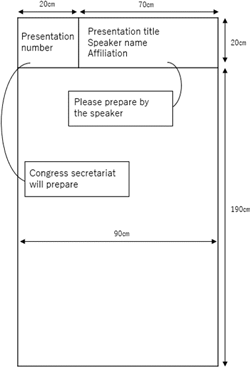
-A ribbon will be placed on the poster board to identify you as the presenter. Please wear this ribbon during your presentation period to help attendees recognize you.
-It is essential to remove your posters within the assigned timeframe to avoid disposal by the conference staff.Ensure the COI disclosure is clearly displayed at the end of your poster for transparency.
|
 |
| [Congress Secretariat] | c/o KYODOPLUS CORPORATION Tatsumi 20-110, Kita-ku, Okayama, 700-0976 JAPAN Phone: +81-86-250-7681 Fax: +81-86-250-7682 E-mail: jscn67@kwcs.jp |