
Presentation Guidelines
Language
Official language: English
For Chairpersons
| ● | Chairpersons are requested to take seats at the front-right row of their session room at least 15 minutes before the session starts. |
| ● | Chairpersons are asked to cooperate to chair their session within the time allotted for each presentation. |
| ● | During the Q&A period, please ask participants with questions and/or comments to stand in line by the microphone in advance. |
Oral Presenter Guidelines
| ● | All oral presentations must be made on a PC using a Windows operating system. |
| ● | All speakers are requested to review and upload their presentation /check the connection of their own laptop and equipment in the PC Preview Desk inside each session room at least 20 minutes prior to their scheduled session. Please bring the data with USB flash memory drive or their own laptop. PC Preview Desk will open from 8:30 AM to 16:30 PM on July 18 and 19. |
| ● | All speakers are requested to be seated at the front-left row of session room at least 10 minutes before the session starts. |
| ● | Presentation times are differs depending on each presentation. |
| ● | Please ensure that your presentation will function on the specifications given below. OS: Windows 10 Software: Microsoft365 Monitor screen size: 16:9 (1366×768) ※There is no official PowerPoint template for this congress. |
| ● | To avoid display problems with your presentation, use only standard OS fonts such as Times New Roman, Arial, Arial Black, Arial Narrow, Century, Century Gothic, Courier, Courier New or Georgia. |
| ● | If you use Macintosh to make your presentation, or your presentation data includes movies/videos, please bring your own laptop with a VGA adapter or a HDMI adapter. |
| ● | If you use sound, please let a staff at the PC Preview Desk know about it. |
| ● | To avoid the possible spread of computer viruses, please always scan your presentation files beforehand with updated anti-virus software. |
| ● | You will use the mouse and/or the keyboard on the podium to advance your slides. There will be a speaker timer and computer monitor in the podium. The monitor will show your slides. The mouse arrow may be used as a pointer on the screen. |
| ● | Please be sure to print any notes you expect to need, as the “Presenter” view with notes will not be available. |
| ● | Any copies of your presentation data which the Secretariat has received will be deleted after the congress. |
[If you are bringing your own PC]
| ● | Please bring your own PC and back-up data with you on a Windows readable USB flash Drive. |
| ● | Speakers using their own laptops MUST HAVE a VGA adapter or a HDMI adapter. Special video output cable is required for some laptops to use the VGA/HDMI to connect to external monitors and data projectors. Please note that we are not equipped with that special cable and you must bring it in case it is necessary. |
| ● | Please turn off the screen-saver and energy saving mode beforehand. |
| ● | After checking your laptop at the PC Preview Desk, operators will keep your laptop there until your presentation ends. |
Poster Presenter Guidelines
Schedule:
Presenters are asked to print, stand with, and present their poster during poster discussion time scheduled from 12:00 PM to 13:00 PM on July 18 and/or from 13:00 PM to 13:30 PM on July 19.
*You can choose to participate in one or the other discussion time according to your convenience.
Posters may be hung beginning at 9:00 AM on July 18 for all poster presenters and please remove your poster between 14:00 PM to 16:00 PM on July 19.
Presenters are asked to print, stand with, and present their poster during poster discussion time scheduled from 12:00 PM to 13:00 PM on July 18 and/or from 13:00 PM to 13:30 PM on July 19.
*You can choose to participate in one or the other discussion time according to your convenience.
Posters may be hung beginning at 9:00 AM on July 18 for all poster presenters and please remove your poster between 14:00 PM to 16:00 PM on July 19.
| Poster Discussion Time | 12:00- 13:00 PM, July 18 13:00- 13:30 PM, July 19 |
| Set up | From 9:00 AM, July 18 |
| Removal | 14:00- 16:00 PM, July 19 |
| ● | The size of poster board is 160 cm tall × 90 cm wide (This is the size of the main text area). Do not exceed the size of the board. |
| ● | All posters will be assigned a board for display onsite at the congress. The poster board is indicated by Poster Number prepared by the Congress Secretariat. Presenters are requested to prepare a paper with the presentation title, presenter name(s), and affiliation(s) horizontally within a 20 cm by 70 cm space, or include on your poster. |
| ● | There is no specific poster template for this congress. |
| ● | Pins will be available onsite at each board and onsite to hang your poster. You will NOT be allowed to use glue, tape, paint, or staples on the poster boards. |
| ● | Posters need to be hung and removed following the schedule above. If you do not remove your poster during the removal time, your poster will be automatically removed and discarded by the congress secretariat. |
[Poster Board Image]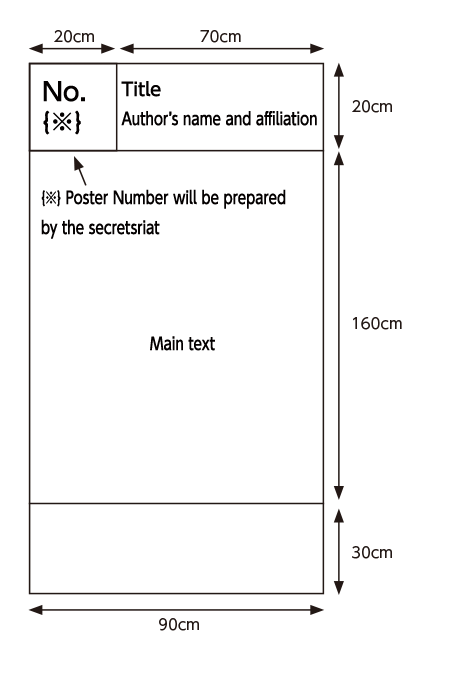 |
[Poster Presentation Layout]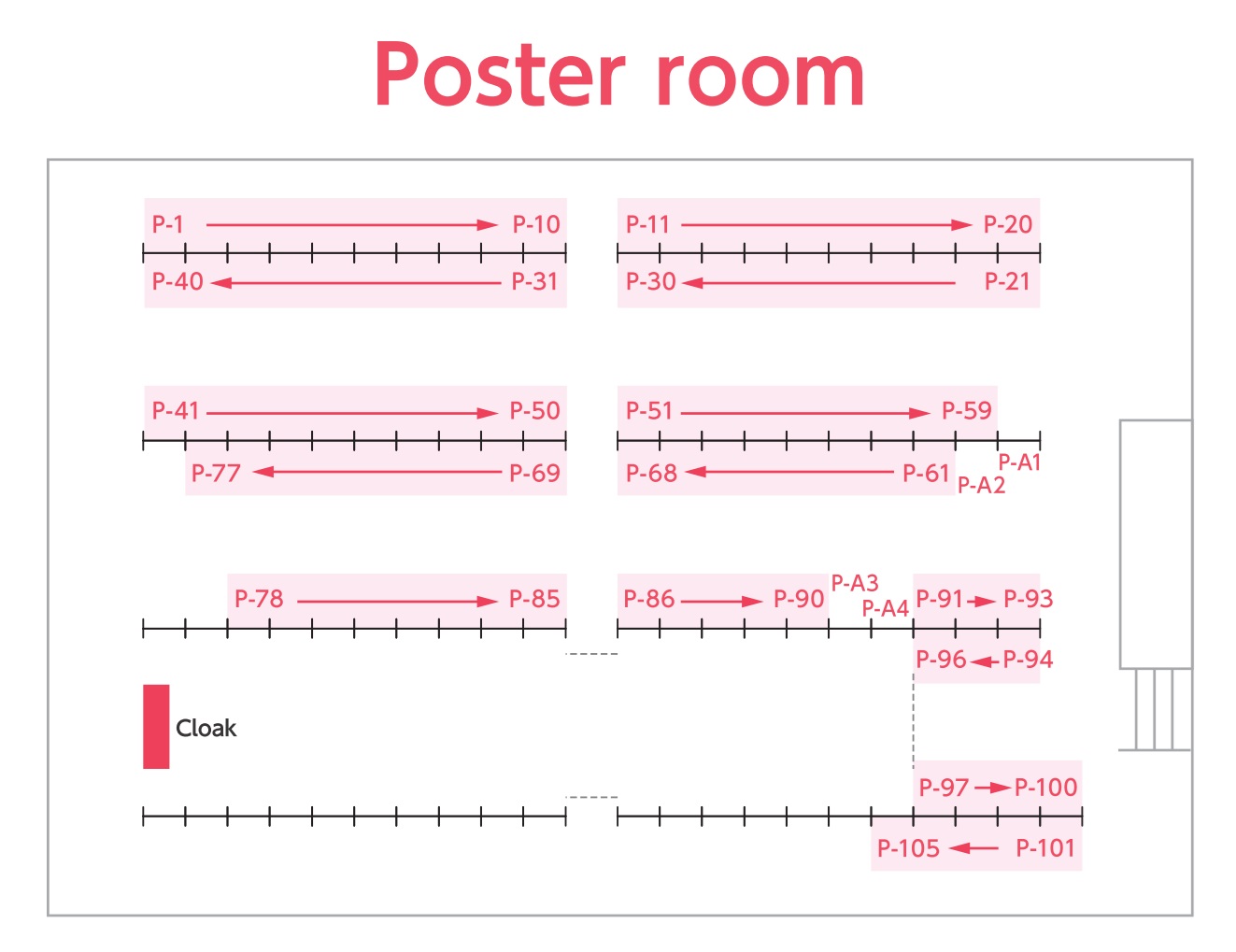 |
| Central Office of CLEFT TOKYO 2024 | |
| Oral & Maxillofacial Surgery, Graduate School of Medicine, The University of Tokyo Hongo7-3-1, Bunkyo-ku, Tokyo 113-0033, Japan |
| Secretariat, CLEFT TOKYO 2024 | |
| KYODOPLUS CORPORATION 2F, Hatchobori 3-14-4, Chuo-ku, Tokyo 104-0032, Japan Phone:+81-3-5530-9245 Fax:+81-3-5530-9246 Email:icpf16@kwcs.jp |
Copyright © CLEFT TOKYO 2024 All rights reserved.